
Open an account at OKX, Bybit Global, WEEX or BloFin
Through our link, or with the account you already have. You set USDT (at OKX: USDC) aside for Flow. The guide for your exchange shows which account setup to use.
Now liveSpot bot · BTC · SOL · DOGE
Just B Free Flow is our spot bot for BTC, SOL and DOGE. Every order our bots place is mirrored proportionally on your own account within seconds. You watch along, your money stays where it is.
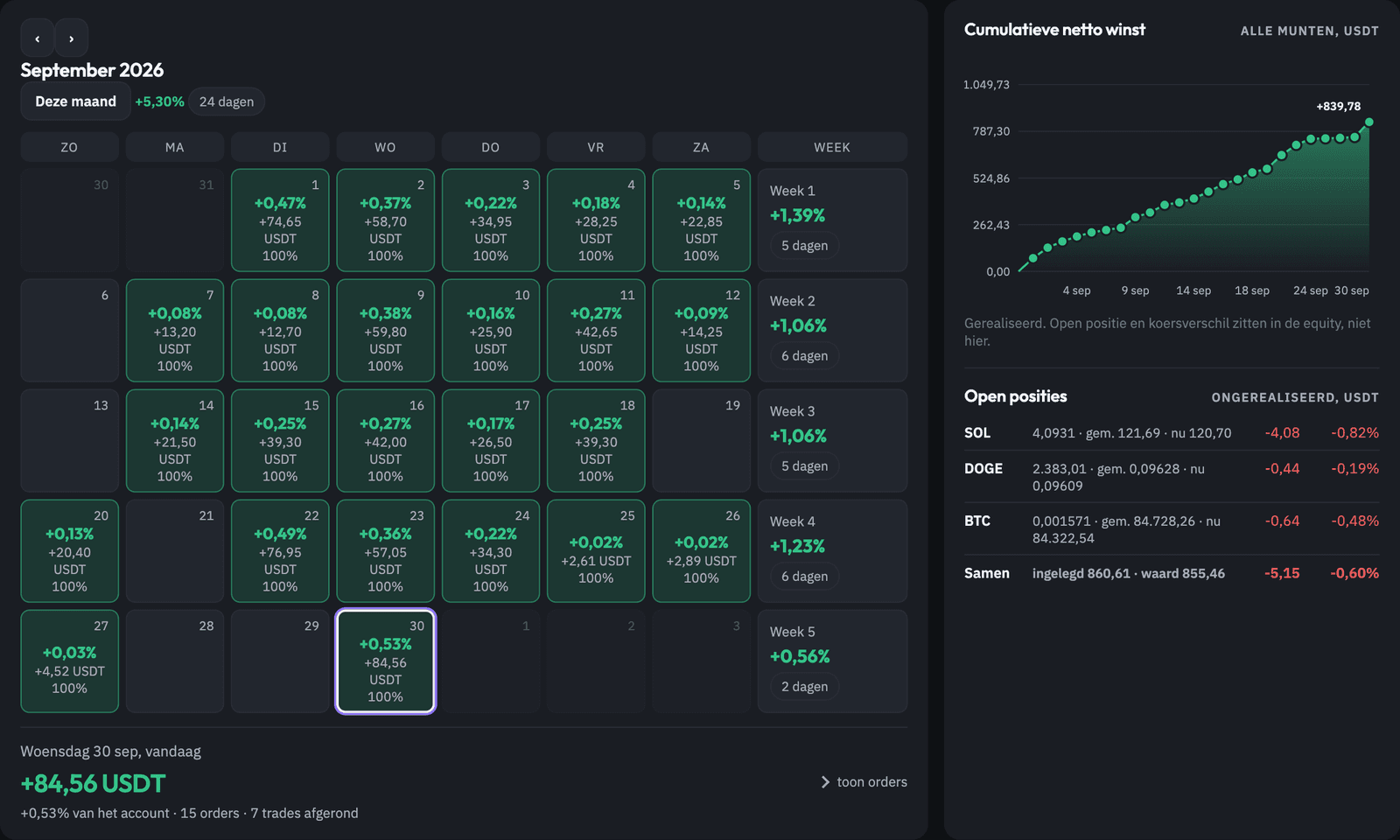
Example account
Figures for illustration, not real results
How it works
You open nothing new with us and you transfer nothing. You connect your own exchange account and the bot trades along on it.
Through our link, or with the account you already have. You set USDT (at OKX: USDC) aside for Flow. The guide for your exchange shows which account setup to use.
Buy and sell, nothing else. No withdrawals, no transfers. You enter the key only through your personal secure setup link; the guide walks you through every step.
Once connected, your account shows Connected · Awaiting Activation. There is no trial mode and there are no test orders. Your account only goes LIVE after the applicable terms, your explicit consent, sufficient balance and our final activation. From then on every order from our bots is placed proportionally on your account within seconds.
We review every application by hand. Once approved, you receive a personal secure setup link and a guide with a screenshot of every step. Connecting takes about fifteen minutes.
What the bot does
The bots work with a ladder: they buy in steps as the price falls and sell those steps again once the price recovers. They earn from movement, not from guessing a direction.
No leverage, no borrowing and therefore no liquidation. You genuinely own the coins.
Everything sits on your own exchange account. We cannot withdraw or transfer anything.
If a bot buys 2% of its account, your account also buys 2%. Large or small account, same ratio.
With open positions your account is sometimes under water. That is part of the ladder: the bot waits for recovery instead of selling at a loss.
The dashboard
You log in with a personal code and see only your own account. The dashboard is for watching only: the bot does the buying and selling, and only you can withdraw, at your own exchange.

Example figures to illustrate the dashboard, not real results.
Net result
All closed profit and loss combined, after exchange fees. As an amount or as a percentage of your account.
Win %
The share of closed trades that closed at a profit, with counters for win, flat and loss.
Profit factor
Total profit divided by total loss. Above 1 means more was won than lost.
Daily win %
The share of trading days that ended positive.
Avg. profit per trade
The average result per closed step, in percent.
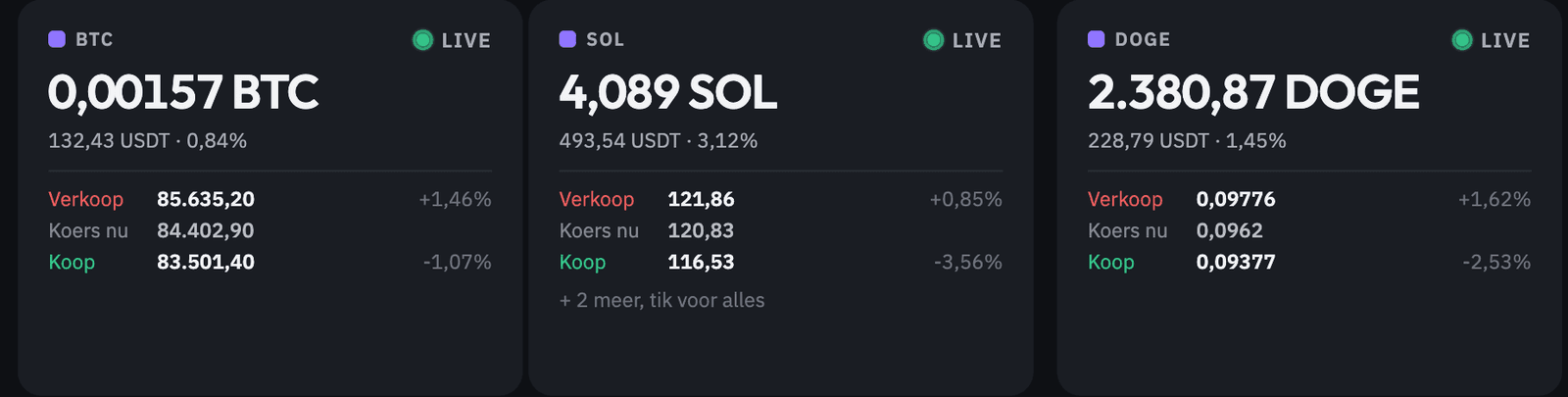
For BTC, SOL and DOGE you see how much you hold, the current price and the level at which the bot buys or sells next.
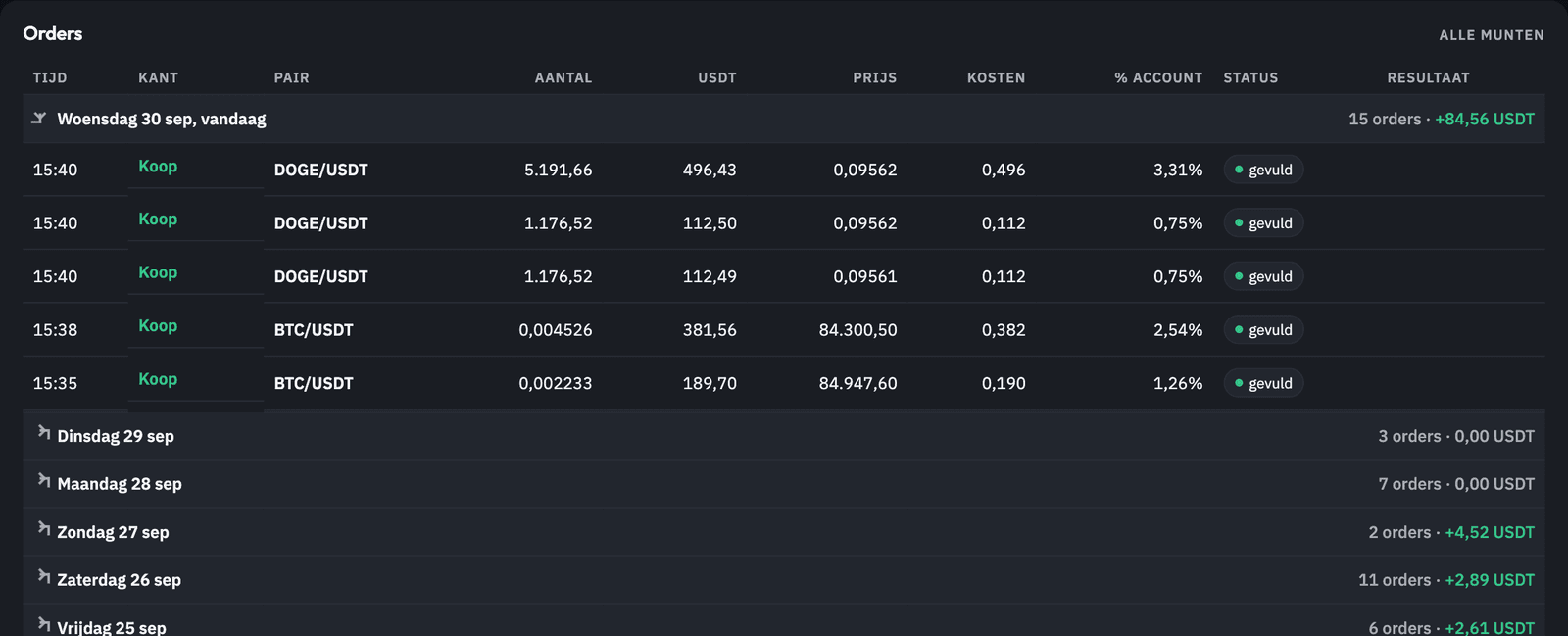
Time, side, pair, amount, price, fees, percentage of your account and status. Nothing is left out.
The realised result per day, summed per week. Tap a day for that day's orders.
What is still held, with average entry, current price and the unrealised difference.
You always see when the next settlement is due and how much realised profit has been built up above your high-water mark so far.
Fees
If the bot makes no profit on your account, you pay nothing. We settle on what was actually realised, after exchange fees.
15%
of realised profit
If you open your account at OKX, Bybit Global, WEEX or BloFin through our link, we receive a share of the exchange's trading fees. That is why your profit share is lower.
Our links per exchange20%
of realised profit
Already have an account at one of these exchanges? You can simply use it. The profit share is then 20%.
We only settle on realised profit: what has been sold, after exchange fees. Open positions do not count. On top of that there is a high-water mark: only realised profit above the previous highest point is settled.
Who it is for
Flow trades in stablecoins and earns from movement. It is not a bitcoin savings plan and not a bet on a direction, but an addition next to what you already do.
“The part of your portfolio that does not depend on whether someone is right.”
Frequently asked questions
No. The API key you create can only buy and sell. Withdrawals and transfers are switched off and you check that yourself when creating it. Your money stays on your own exchange account the whole time.
The bot buys in steps until its ladder is full, then waits for recovery. During that period your account shows red on the open positions. That can take a long time. Flow is therefore only suitable for money you do not need in the short term.
15,000 USDC or USDT in the account you connect to Flow. Below that, the bot's smallest steps become too small for the exchange's minimum orders and your account no longer stays in step with the bots.
Applications are reviewed by hand. If you are approved, you receive a personal secure setup link to connect your exchange. We do not promise a fixed start date: your account only goes LIVE after final activation.
Every 90 days, only on realised profit: what has been sold, after fees. Open positions do not count. The dashboard counts down and shows the amount under Pay; you pay in USDT or USDC. Thanks to the high-water mark you never pay twice on the same profit.
Yes. You delete the API key at your exchange (OKX, Bybit Global, WEEX or BloFin) and the bot can no longer do anything on your account. Open positions remain yours; you can hold or sell them yourself.
OKX, Bybit Global, WEEX and BloFin. OKX holds a European licence and lets EU accounts trade in USDC; Bybit Global, WEEX and BloFin are for followers outside the EU only (non-EU) and trade in USDT. The bots run the same strategy on all four.
That depends on your country of residence. In the dashboard you can look back per day and per order, so you or your advisor have the overview. We do not give tax advice.
Only through your personal secure setup link, never by chat or email. The guide shows how to create a key that can only trade, so even if it leaked nothing could be withdrawn.
Now live
Leave your email address and pick your exchange. You get the step-by-step guide (pdf) for your exchange, so you are ready once your application is approved. No newsletter spam.